



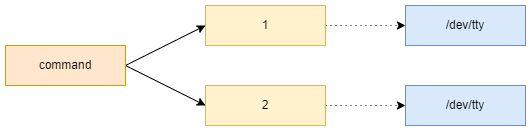
Summary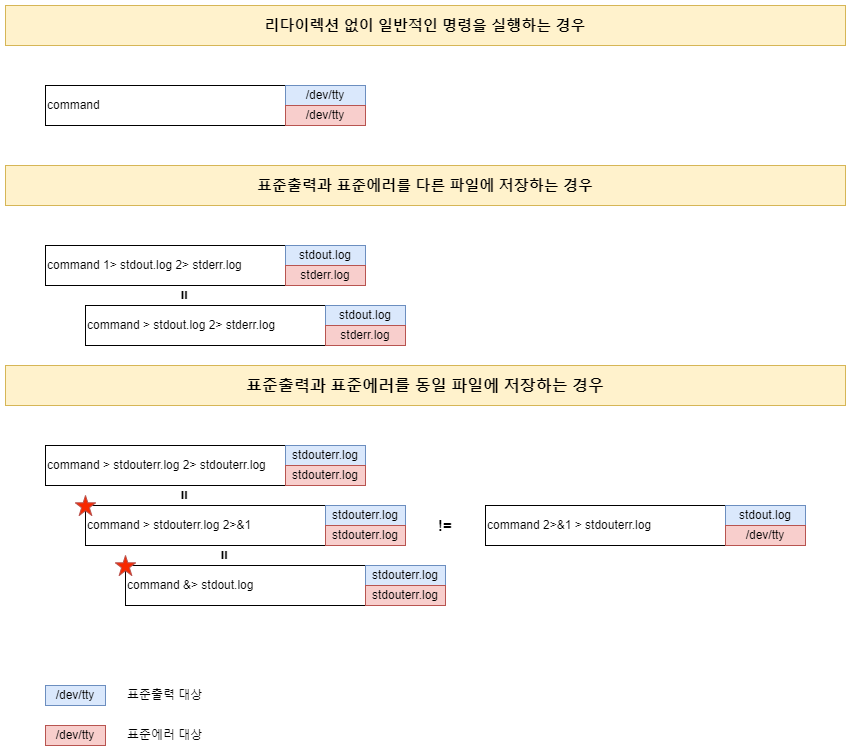 존재하지않는 파일 'nofile.txt'을 cat 명령어로 지정하면 일반적으로 아래와 같은 결과를 얻는다. 즉, 실행결과와 에러를 표준 출력장치(/dev/tty)로 출력합니다.
[opradm@hvdev-tst-svr01 ~]$ cat nofile.txt cat: nofile.txt: No such file or directory |

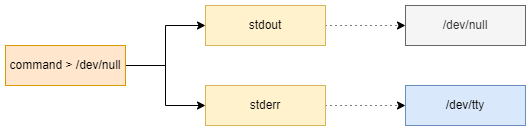
'>'는 표준출력의 FD를 변경
[opradm@hvdev-tst-svr01 ~]$ cat nofile.txt > /dev/null cat: nofile.txt: No such file or directory [opradm@hvdev-tst-svr01 ~]$ |
'>'는 '1>'와 동일하다.
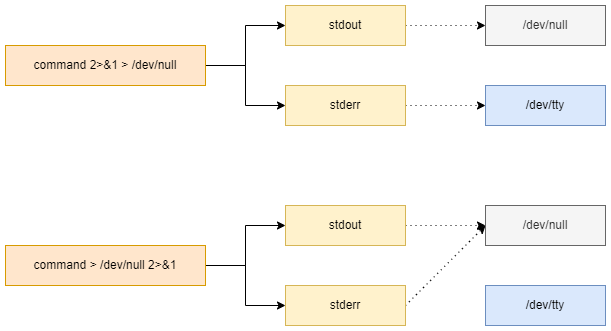
'2>&1 > /dev/null'과 '> /dev/null 2>&1'의 차이점
[opradm@hvdev-tst-svr01 ~]$ cat nofile.txt 2>&1 > /dev/null cat: nofile.txt: No such file or directory [opradm@hvdev-tst-svr01 ~]$ cat nofile.txt > /dev/null 2>&1 [opradm@hvdev-tst-svr01 ~]$ |
The
&means file descriptor1. So2>&1redirects standard error to whatever standard output currently points at, while2>1redirects standard error into a file called1.Also, the redirects happen in order. So if you say
2>&1 >/dev/null, it redirects standard error to point at what standard output currently points at (which is probably a noop), then redirects stdout to /dev/null.'> /dev/null 2>&1'은 '&> /dev/null'와 동일하다.