


 DoubleSH
Hyper-v 구성 후 시험적으로 Win2012 설치하려니 진행이 안됩니다.
There isn’t enough memory available to create a ramdisk device.
Error code: 0x0000017
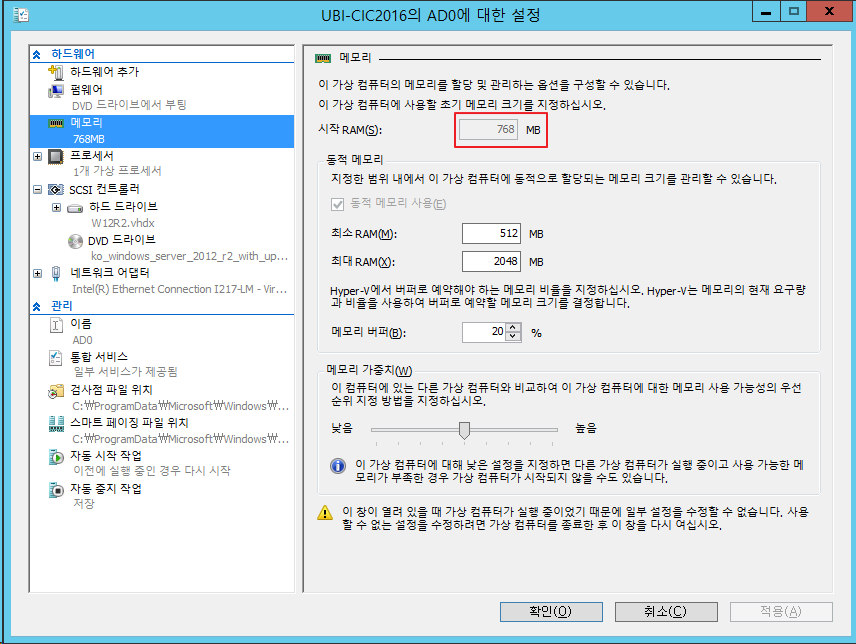
아래와 같이 시작 RAM 을 768로 변경해주니 잘됩니다. (기존 512 )
CTI & VoIP 엔지니어입니다 :) / VoIP, SIP, IPT, IP-PBX, PTT, Asterisk, Mitel

Hyper-v 구성 후 시험적으로 Win2012 설치하려니 진행이 안됩니다.
There isn’t enough memory available to create a ramdisk device.
Error code: 0x0000017
아래와 같이 시작 RAM 을 768로 변경해주니 잘됩니다. (기존 512 )
•Allocate more than 800 MB RAM to the virtual machine you intend to install this release on. Once Setup has completed, you can change the allocation to as little as 512 MB RAM, depending on the actual server configuration.
•Interrupt the boot process of this release on the virtual machine with SHIFT+F10. In the command prompt that opens, use Diskpart.exe to create and format an installation partition. Run Wpeutil createpagefile /path=C:\pf.sys (assuming the installation partition you created was C:). Close the command prompt and proceed with Setup.
출처 : https://technet.microsoft.com/en-us/library/dn303418(v=ws.11).aspx