



[ETC] Ç»Àü IO ¼³Ä¡Çϱâ / À©µµ¿ì

   Á¶È¸ 13881   Ãßõ 1    

http://dell-support.sandisk.com/ (1702)

 http://dell-support.sandisk.com/

Dell_IO_Management_3.2.15.1699_x64.exe 드라이버 설치
dell_iodrive_3.2.11-20150618.fff 펌웨어 파일 다운로드
Dell_IO_Management_Server_3.16.0.38_x64.exe 설치 ( 관리툴)

Dell_IO_Management_3.2.15.1699_x64.exe 설치후에
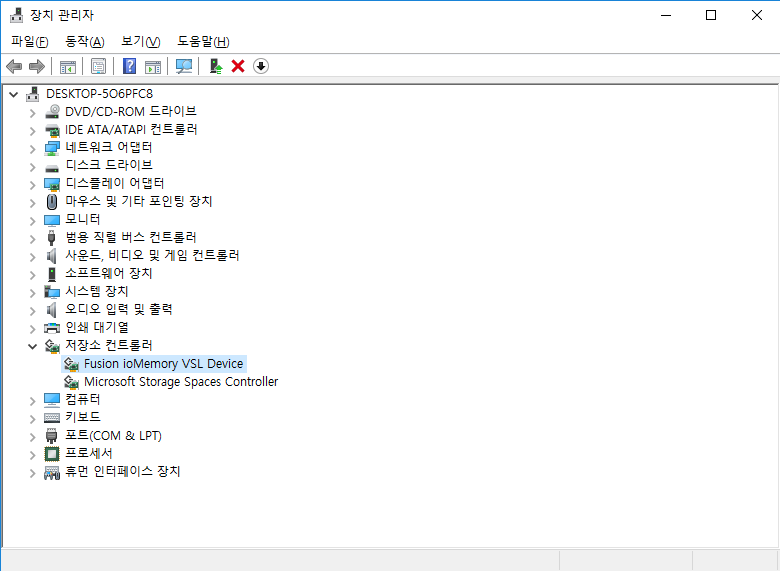
저장소 컨트롤러에서 Fusion ioMemory VSL Device 가 잡혀 있는지 확인

Dell_IO_Management_Server_3.16.0.38_x64.exe 설치후에
Dell IO Management Server 실행하면 configuration 에 확인해 보면 경고가 나와있을겁니다.
이는 펌웨어 업데이트 하라는 경고 입니다.

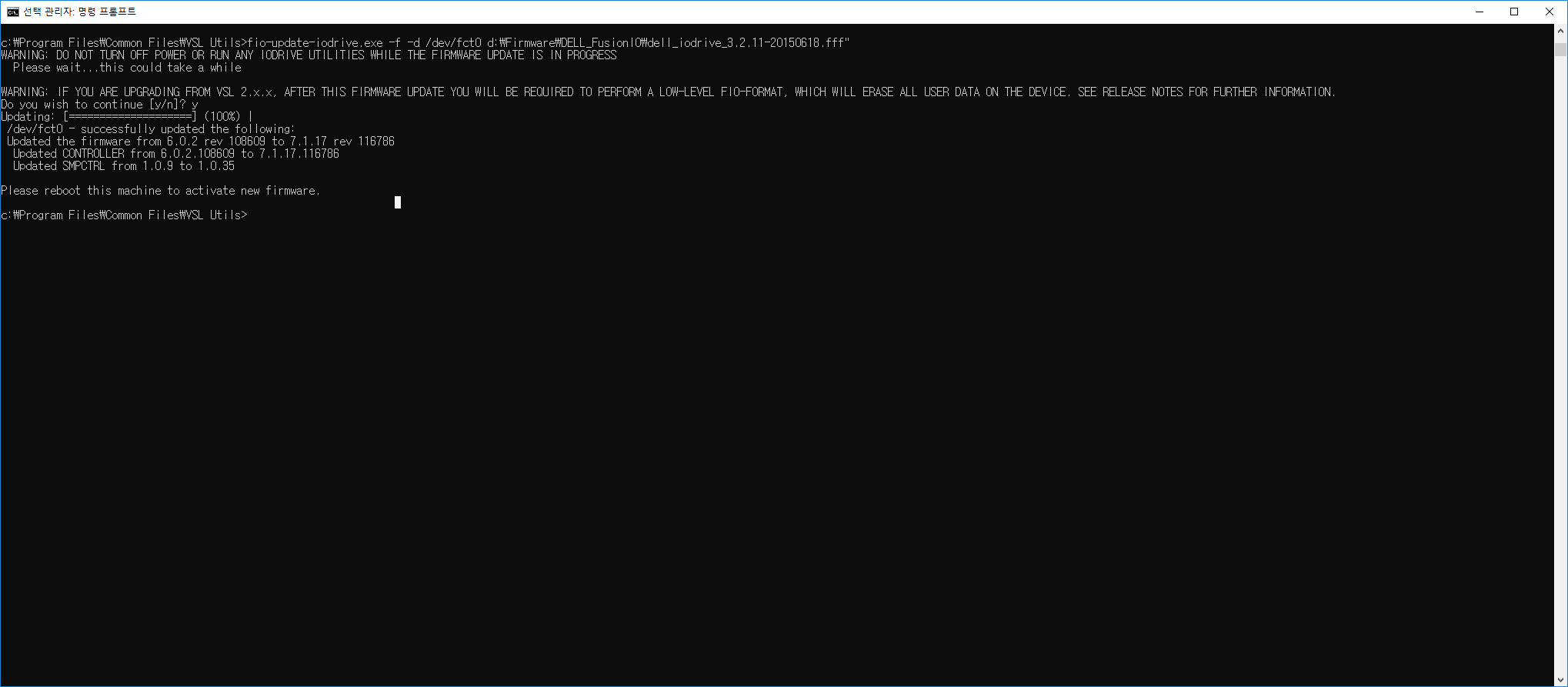
이제 펌웨어 업데이트는 cmd 를 관리자 권한으로 실행하여
c:\program Files\Common Files\VSL Utils 로 이동해서 다음과 같이 입력 합니다.

ex:   fio-update-iodrive.exe -f -d /dev/fct0 "dell_iodrive_3.2.11-20150618.fff 다운위치"
ex :  fio-update-iodrive.exe -f -d /dev/fct0 "d\Firmware\DELL_FusionIO\dell_iodrive_3.2.11-20150618.fff"

y 입력하면 펌웨어 진행 됩니다. 펌웨어 완료되면 재부팅 하셔야 합니다.

이후 Dell IO Management Server 실행하시고 Configuration 에서 포맷하여 사용 하시면 됩니다.

JM시스템 / 010-5425-1573
ªÀº±Û Àϼö·Ï ½ÅÁßÇϰÔ.
NeOpLe 2019-02
Dell_IO_Management_Server_3.16.0.38_x64.exe  ÀÌ ÆÄÀÏÀº ¾îµð¼­ ±¸ÇÒ ¼ö Àִ°ÅÁÒ?
     
À̱Û,  ¸µÅ©¿¡ ÁÖ¼Ò ÀÖ½À´Ï´Ù.
iodrive2 / windows ¼±ÅÃ
°¨»çÇÕ´Ï´Ù!
     
iosphere / Windows / ¼±ÅÃÇÏ½Ã¸é ¹ÞÀ» ¼ö ÀÖ¾î¿ä..
À̽¿± 2019-02
Àü ¿¡·¯°¡ ¾÷µ¥ÀÌÆ® ¿¡·¯°¡ ³³´Ï´Ù. Æú´õ³»¿¡ Á¤º¸°¡ ¾ø´Ù°í ÇÏ´Â°Í °°Àºµ¥~ ·ÒÀÌ ¹®Á¦Àΰ¡¿ä?


Á¦¸ñPage 40/286
04-15   40905   UPDF
2014-05   5851097   Á¤ÀºÁØ1
2022-03   7210   ¸°µå¹ö±×
2009-06   6783   ±è¼±±Ô
2009-02   6499   ¶Ñ¶Ñ±è´ë¿ø
2010-06   7812   Murphys
2010-07   6411   blueshout
2020-10   7606   ¹Ú°Ç
2025-01   4864   ÀüÀÏÀå
2025-06   3152   ¾Èµ¿»ìÀÚ
2010-04   6742   ¸¶½ºÅ©´Â³»¡¦
2018-09   7752   ±è°Ç¿ì
2010-02   7747   ¾ËÆÄ¸Ç
2010-01   6766   ¹ÚÃæ±¸
2017-08   6386   ¾Æ¹Ì33
2019-08   9850   »ßµ¹À̽½ÇÄÀÌ
2019-12   8778   ²Ü¹úlÃÖÀÎÇõ
2020-04   6245   TheSTREET
2021-04   6931   ³Ä¹Ì³Ä¹Ì
2022-03   8261   °¨ÀÚ°¨ÀÚ
2023-02   23079   ÇöÁø
2025-06   4073   ±èÄ¡·¹ÀÎÀú