



CentOS 6.5 SSL인증
http://ehostidc.co.kr/center/EH050402.php?no=279639&page=3&choose=tit… (515)http://ehostidc.co.kr/center/EH050501.php?ke=17 (481)
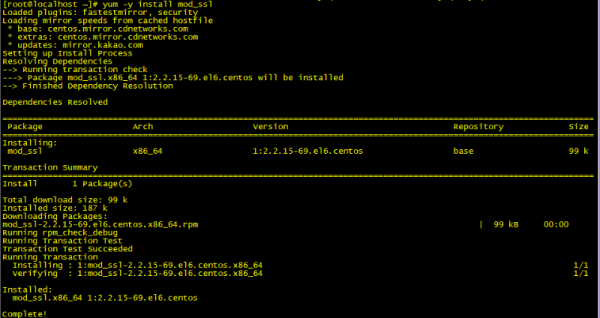
1. 필요패키지 설치 (openssl과 mod_ssl이 필요하나 6.4 이후 버전은 openssl이 설치되어있어 mod_ssl만 설치)
yum -y install mod_ssl
2. self-signed certificate 및 개인 키 생성 (openssl을 이용한 self-signed certificate생성)
openssl genrsa -out ca.key 1024

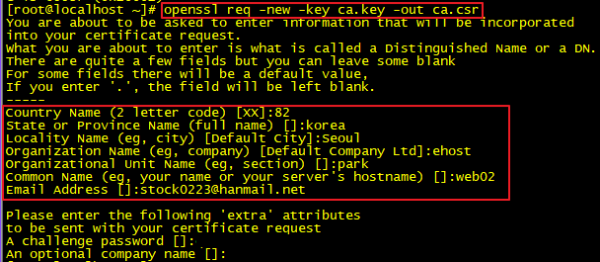
3. CSR (Certificate Signing Request) 생성 / Common Name의 경우 추후 conf파일 설정에 필요
[root@localhost ~]# openssl genrsa -out ca.key 1024
Generating RSA private key, 1024 bit long modulus
.............++++++
.......................................++++++
e is 65537 (0x10001)
[root@localhost ~]# openssl req -new -key ca.key -out ca.csr
You are about to be asked to enter information that will be incorporated
into your certificate request.
What you are about to enter is what is called a Distinguished Name or a DN.
There are quite a few fields but you can leave some blank
For some fields there will be a default value,
If you enter ".", the field will be left blank.
-----
Country Name (2 letter code) [XX]:82
State or Province Name (full name) []:korea
Locality Name (eg, city) [Default City]:Seoul
Organization Name (eg, company) [Default Company Ltd]:ehost
Organizational Unit Name (eg, section) []:park
Common Name (eg, your name or your server"s hostname) []:web02
Email Address []:*********@*******.net
Please enter the following "extra" attributes
to be sent with your certificate request
A challenge password []:
An optional company name []:
4. self signed key 생성
openssl x509 -req -days 365 -in ca.csr -signkey ca.key -out ca.crt

5. 생성된 파일 복사
[root@localhost ~]# cp ca.crt /etc/pki/tls/certs
[root@localhost ~]# cp ca.key /etc/pki/tls/private/ca.key
[root@localhost ~]# cp ca.csr /etc/pki/tls/private/ca.csr

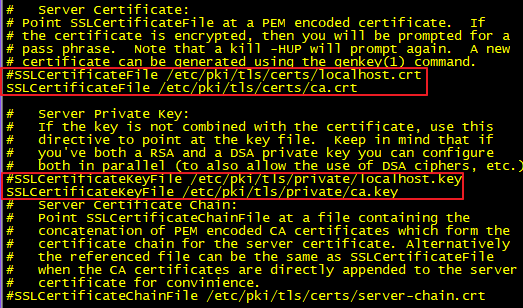
6. SSL conf파일 수정
[root@localhost ~]# vi /etc/httpd/conf.d/ssl.conf
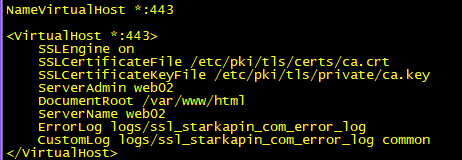
7. config 파일 내 virtualhost 추가
vi /etc/httpd/conf/httpd.conf
8. 443포트 추가 및 데몬 재시작
[root@localhost ~]# vi /etc/sysconfig/iptables
-A INPUT -m state --state NEW -m tcp -p tcp --dport 443 -j ACCEPT <-추가
wq!
[root@localhost ~]# service iptables restart
iptables: Setting chains to policy ACCEPT: filter [ OK ]
iptables: Flushing firewall rules: [ OK ]
iptables: Unloading modules: [ OK ]
iptables: Applying firewall rules: [ OK ]
[root@localhost ~]# service httpd restart
Stopping httpd: [ OK ]
Starting httpd: [ OK ]
쉽게 ssl 서비스가 가능하나요?ㅎㅎ